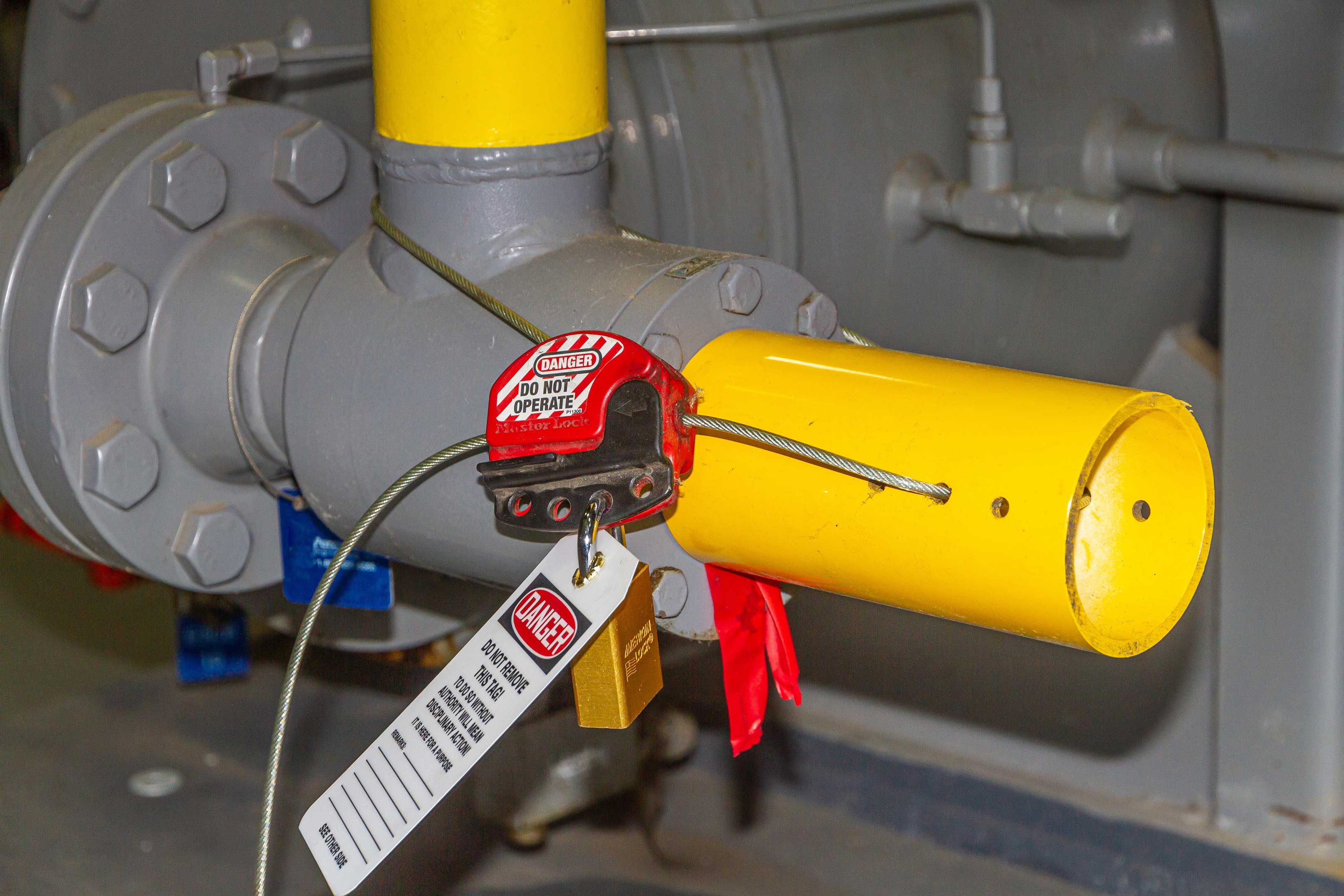
Machines don’t shut down safely on their own. When maintenance, cleaning, or repairs are needed, residual energy—electrical, hydraulic, pneumatic, thermal, or chemical—can turn a routine task into a life-threatening event. That’s where lockout tagout (LOTO) comes in. At the heart of every LOTO program are the physical tags that serve as warnings, assignments, and accountability tools. Printable lockout tagout tags offer a cost-effective, customizable solution for facilities that need reliable, compliant tagging without a supply chain bottleneck.
These aren't just slips of paper. They’re critical communication devices that say: This equipment is unsafe. Do not operate. Someone is at risk. When done right, printable LOTO tags reinforce safety procedures. When done poorly, they become ignored clutter—worse than useless, they breed complacency.
Let’s break down how to implement printable lockout tagout tags that meet OSHA standards, support your team, and actually get used.
Why Printable Lockout Tagout Tags Matter
Printable LOTO tags solve a real operational pain point: accessibility. A company may have a perfect LOTO procedure, but if tags aren’t immediately available during an emergency repair, workers improvise. They might skip tagging altogether or use a coffee-stained Post-it note. That’s a compliance failure waiting to happen.
Printable tags let supervisors and safety officers:
- Respond instantly to maintenance needs
- Customize fields (e.g., add site-specific hazard warnings)
- Maintain consistency in design and language
- Reduce long-term costs compared to pre-printed stock
More importantly, they keep safety on the floor—not locked in a cabinet or stuck in procurement limbo.
What Makes a Lockout Tagout Tag OSHA-Compliant?
OSHA 29 CFR 1910.147 sets the standard for control of hazardous energy. Tags, while not a substitute for physical locks, must meet specific criteria to be compliant.
A printable LOTO tag must include:
| Requirement | Example |
|---|---|
| Clear warning statement | "DO NOT OPERATE – LOCKED OUT" |
| Name of the authorized employee | "Tag applied by: James Rivera" |
| Date and time of lockout | "Locked out: 04/05 – 8:15 AM" |
| Reason for lockout | "Motor alignment in progress" |
| Company name or department | "Facility Maintenance – Unit B" |
Critical note: The tag alone does not provide protection. It must accompany a physical lock that secures the energy-isolating device. Tags are warnings; locks are barriers.
Common mistakes with printable tags include:
- Using flimsy paper that tears easily
- Forgetting to include employee name and time
- Relying on handwritten tags with illegible script
- Not storing printed tags in a protected, dry location
A compliant printable tag should be durable, legible, and standardized.
Best Materials and Printing Practices

Just because a tag is printable doesn’t mean it has to look like a Word doc cut with scissors. The goal is durability and visibility.
Recommended Materials:
- Cardstock (110 lb or higher): Ideal for in-house printing. Resists tearing and folds well.
- Synthetic paper (e.g., Yupo): Waterproof and chemical-resistant. Best for harsh environments like refineries or food processing.
- Thermal transfer labels: Stick to lockout hasps or control panels. Excellent for barcoded tags.
Printing Tips:
- Use a laser printer for smudge-proof output. Inkjet can smear if exposed to moisture.
- Print in high contrast colors: Red, yellow, or orange backgrounds with black text.
- Include a hole punch guide on the template so tags attach easily to locks or hasps.
- Pre-print batches during downtime to avoid delays during maintenance.
For high-traffic facilities, consider laminating critical tag templates or printing on adhesive-backed stock for added durability.
You don’t need to design from scratch. Several trusted sources offer free, customizable, printable LOTO tag templates.
5 Reliable Sources for Printable LOTO Tags
| Source | Features | Best For |
|---|---|---|
| OSHA.gov | Official compliance templates, plain language, no branding | Regulatory alignment, baseline safety |
| National Safety Council (NSC) | Industry-specific tags (electrical, mechanical, etc.), bilingual options | Multilingual teams, complex environments |
| SafetySign.com | Editable PDFs, OSHA-compliant layouts, color-coded designs | Quick deployment, visual consistency |
| Creative Safety Supply | Free downloadable kits with lockout logs and checklists | Full LOTO program support |
| Template.net | Word and Excel-based, fully customizable fields | Facilities needing deep customization |
Pro tip: Download multiple templates and run a pilot test. Have maintenance staff try them during a non-critical shutdown. Feedback on size, readability, and ease of use will help you choose the best fit.
Common Use Cases and Real-World Applications
Printable LOTO tags aren’t one-size-fits-all. How they’re used depends on the environment and workflow.
1. Emergency Repairs in Manufacturing A conveyor belt jams during shift change. A technician needs to clear it fast. Instead of waiting for pre-printed tags, the supervisor prints a tag from a secure template, fills in the details, locks out the motor disconnect, and attaches the tag. The team resumes only after verification.
“We used to lose 20 minutes waiting on tags. Now we print them in under a minute.” – Plant Supervisor, Ohio
2. Contractor Work in Commercial Facilities An HVAC contractor arrives for chiller maintenance. The facility manager provides a printed tag with company branding, ensuring accountability and traceability, even though the worker isn’t a direct employee.
3. Small Workshops Without Dedicated Safety Supplies A machine shop with five employees can’t justify bulk orders of pre-printed tags. Instead, they keep a digital template on a shared drive and print as needed—cutting costs and staying compliant.

In all cases, the key is standardization. Even if tags are printed on demand, format, language, and placement must remain consistent.
Customization: When and How to Tailor Your Tags
While OSHA sets baseline requirements, customization can improve clarity and safety.
Effective customizations include:
- Adding site-specific hazard icons (e.g., high voltage, rotating parts)
- Including QR codes that link to the full LOTO procedure
- Using color coding by department or equipment type
- Bilingual text for Spanish-English worksites
But avoid:
- Overcrowding with too much text
- Deviating from the “DO NOT OPERATE” warning format
- Using informal language or humor
One facility in Texas added a red border with a die-cut warning triangle—making tags instantly recognizable from 10 feet away. Simple, but effective.
Pitfalls to Avoid with Printable LOTO Tags
Printable doesn’t mean “good enough.” Many programs fail because of overlooked details.
Common Failures:
- No audit trail: If tags aren’t logged or reviewed, they become invisible. Pair printable tags with a daily LOTO log.
- Poor storage: Storing printed tags in a damp toolbox ruins them. Use a sealed, labeled folder near the maintenance station.
- Lack of training: Workers must know how and when to use tags, not just where to find them. Reinforce during safety meetings.
- One template for all hazards: A tag for electrical lockout should look different from one used on hydraulic systems.
Remember: A tag that’s ignored is worse than no tag at all. It creates a false sense of security.
Integrating Printable Tags into Your LOTO Program
Printable tags should be part of a broader energy control strategy, not a standalone fix.
Actionable integration steps:
- Audit current LOTO procedures – Are tags readily available? Are they being used correctly?
- Select 1–2 master templates – Avoid template sprawl. Standardize across departments.
- Train all authorized employees – Include hands-on practice with printing, filling out, and attaching tags.
- Conduct monthly spot checks – Review used tags for completeness and compliance.
- Update templates annually – Or whenever equipment, language needs, or regulations change.
Keep digital copies of your approved templates backed up and accessible—even during network outages.
Final Thoughts: Safety Starts with a Tag
Printable lockout tagout tags are more than paperwork. They’re frontline tools in preventing amputations, electrocutions, and equipment damage. When designed well, printed on durable stock, and used consistently, they meet OSHA standards and earn trust from the people who rely on them.
Don’t wait for a near-miss to act. Download a compliant template today, test it with your team, and make sure every lock has a clear, legible, permanent-looking tag.
Safety isn’t built in moments of crisis. It’s built in the quiet decisions—like choosing the right tag—made every day.
FAQ
What should be on a lockout tagout tag? A compliant tag includes a warning (e.g., "DO NOT OPERATE"), the worker’s name, time/date of lockout, reason for lockout, and company or department.
Can I use a handwritten tag instead of printed? Yes, if it’s legible and includes all required fields. However, printed tags reduce errors and improve professionalism.
Are printable LOTO tags OSHA-approved? OSHA doesn’t approve specific products. But printable tags are compliant if they meet 1910.147 requirements for durability, legibility, and content.
Where should I store printable LOTO tags? Keep digital templates on a secure, accessible drive. Print and store physical copies in a dry, labeled container near maintenance stations.
Can I reuse a printed LOTO tag? No. Tags are single-use. Reusing a tag creates confusion about who applied the lockout and when.
Do I need a lock with every tag? Yes. Tags are warnings; locks are physical safeguards. OSHA requires both in most cases.
How often should LOTO tags be inspected? Tags should be checked during use and reviewed during regular safety audits—ideally monthly.